
Download Delibr AI – AI‑Powered Product Documentation Tool for Teams
Overview
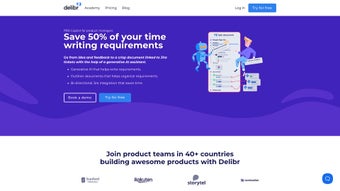
Delibr AI is a next‑generation, AI‑driven assistant built especially for product managers who need to produce clear, concise, and up‑to‑date product documentation without the usual manual overhead. By combining dynamic templates, real‑time writing assistance, and a two‑way integration with Jira, Delibr AI transforms the way product teams capture requirements, roadmaps, and stakeholder discussions. The platform automatically generates documentation based on structured product hierarchies, offers a solution hub for prioritizing ideas, and provides visual opportunity‑solution trees that map user problems directly to potential features.
Its “now‑next‑later” roadmap view keeps teams aligned on short‑term deliverables while maintaining a strategic long‑term vision. While Delibr AI shines in its automation and alignment capabilities, it does not currently support offline work and offers limited native collaboration features beyond Jira sync. Overall, the tool is a powerful, secure, and continuously updated SaaS solution that helps product managers reduce time spent on repetitive documentation tasks, improve document quality, and keep every stakeholder on the same page.
Core Features & Benefits
- AI‑Generated Document Drafts: Instantly create PRDs, feature briefs, and release notes with natural‑language suggestions that follow industry best practices.
- Dynamic Templates: Choose from pre‑built, customizable templates that adapt to your product’s lifecycle stage.
- Two‑Way Jira Integration: Sync epics, stories, and tickets directly to documentation and push updates back to Jira without leaving the app.
- Structured Product Hierarchy: Organize components, sub‑features, and dependencies in a visual tree for instant clarity.
- Solution Hub & Prioritization: Capture stakeholder feedback, rank ideas, and surface the most valuable opportunities.
- Roadmap Visualizer (Now‑Next‑Later): Plot initiatives across time horizons, enabling transparent planning and resource allocation.
- Opportunity‑Solution Trees: Connect user pain points to potential solutions, making it easier to justify feature decisions.
- Feedback Loop Engine: The AI continuously refines its suggestions based on team edits, improving clarity and conciseness over time.
- Secure Cloud‑Based Architecture: All data is encrypted at rest and in transit, complying with ISO‑27001 and GDPR standards.
- Automatic Updates: New features, template improvements, and AI model upgrades are delivered without manual intervention.
The combination of these features means product managers can spend up to 40 % less time on documentation, freeing valuable bandwidth for strategic work. The AI’s context‑aware suggestions also reduce the risk of ambiguous requirements, which historically cause rework and missed deadlines. By centralizing product knowledge in a single, searchable hub, Delibr AI helps cross‑functional teams—from engineering to marketing—stay aligned, leading to faster delivery cycles and higher stakeholder satisfaction.
Installation, Compatibility & Practical Use
Getting Started
Delibr AI is delivered as a cloud‑native SaaS platform, so there is no traditional “installation” process. Users simply create an account at delibr.ai, verify their email, and are prompted to connect their Jira instance via OAuth. The integration wizard walks you through selecting the projects you wish to sync, mapping issue types (epic, story, task), and configuring update frequency (real‑time or hourly). Once the connection is established, Delibr AI automatically pulls existing tickets into its knowledge base, allowing you to start generating documentation immediately.
Supported Operating Systems
Because Delibr AI runs in the browser, it is compatible with all modern operating systems that support a recent version of Chrome, Edge, Firefox, or Safari. This includes Windows 10/11, macOS 12+, Linux distributions, as well as mobile browsers on iOS and Android. The responsive design ensures a seamless experience on tablets and smartphones, though the full feature set (especially roadmap visualizations) is best utilized on a desktop or laptop screen.
Pros & Cons
- Pros:
- AI‑driven content creation dramatically cuts drafting time.
- Two‑way Jira sync guarantees that documentation never falls out of date.
- Visual roadmap and solution‑tree tools improve strategic alignment.
- Secure, GDPR‑compliant cloud storage protects sensitive product data.
- Continuous, automatic updates keep the tool fresh without user effort.
- Cons:
- No offline mode—access requires an internet connection.
- Collaboration features are limited to comments; real‑time co‑editing is not yet supported.
- Pricing may be a barrier for very small startups without a budget for SaaS tools.
- Learning curve for teams unfamiliar with AI‑assisted writing.
Typical Workflow
A product manager starts by selecting a template (e.g., “Feature Brief”). The AI prompts for high‑level goals, target users, and success metrics. As the manager fills in the fields, Delibr AI suggests bullet points, risk mitigations, and acceptance criteria based on similar historical entries.
Once the draft is complete, the manager clicks “Push to Jira,” which creates a new epic and attaches the document as a Confluence page (if connected). Stakeholders receive a notification, review the content, and add feedback directly within the platform. The AI then refines the text to incorporate the comments, ensuring the final document is concise and clear.
Frequently Asked Questions
Is Delibr AI free to use?
Delibr AI offers a 14‑day free trial with full feature access. After the trial, plans start at $49 per user per month, billed annually. There is also a “Community” tier that provides limited access to templates and AI suggestions at no cost.Can I use Delibr AI with tools other than Jira?
Currently, the native two‑way sync is only available for Jira. However, Delibr AI supports CSV import/export, and its API can be leveraged to connect with other project‑management platforms such as Azure DevOps or Trello.Is my data stored securely?
Yes. All data is encrypted at rest (AES‑256) and in transit (TLS 1.3). Delibr AI complies with ISO‑27001, SOC 2, and GDPR, ensuring that sensitive product information remains protected.Do I need any special hardware to run Delibr AI?
No special hardware is required. Because the application is web‑based, any device with a modern browser and an internet connection can access the full feature set.How does the AI improve over time?
Delibr AI continuously learns from the edits and feedback you provide. The underlying language model is fine‑tuned monthly with anonymized usage data, resulting in more accurate suggestions and better alignment with your organization’s tone and standards.Conclusion & Call to Action
For product managers who juggle feature definition, stakeholder alignment, and roadmap communication, Delibr AI offers a compelling, AI‑enhanced solution that centralizes documentation and keeps it in sync with the development workflow. The platform’s dynamic templates, intelligent writing assistance, and robust Jira integration eliminate many of the manual steps that traditionally slow down product teams. While the lack of offline mode and limited real‑time collaboration may be drawbacks for some, the overall productivity gains and security posture make Delibr AI a worthwhile investment for growing organizations.
Ready to experience faster, clearer product documentation? Start your free trial today and see how AI can turn repetitive writing into a strategic advantage.
Delibr AI impresses with its AI‑generated drafts, seamless Jira sync, and visual roadmap tools. The platform dramatically cuts documentation time and raises the quality of product specs. Minor limitations include the absence of offline access and limited native collaboration. Overall, a strong addition to any product manager’s toolkit.


.png)



